

An embedded agent gets good at your API fast. It reads your tool contract, it learns which call creates an invoice and which one voids it, and it makes those calls as the signed-in user with the right arguments. That part works.
Then someone asks what your refund window is, and it has no idea.
Not a model problem. Nothing in an API says what your product's words mean. Your
endpoints carry nouns — invoice, credit_note, dunning_run — and none of
them carry the rule that a refund has to land within 90 days of the original
charge, or the reason a dunning run skips annual plans. A schema is a list of
what can be done. It says nothing about what any of it means at your company.
The gap shows up in the wording, too. dunning_run is a name three engineers
agreed on in 2023. "Why did this customer get billed twice?" is the question
that actually arrives. The vocabulary your users have is the one on your help
center and your pricing page, and none of that is in the route table.
The confident wrong answer
Picture an invoicing product. A customer writes in asking for money back on a charge from four months ago. The user opens your agent and asks whether they can refund it.
The agent knows the refund endpoint exists. It knows the charge id. It has no
reason to hesitate, so it says yes, and offers to do it. Then the call comes
back 422 and the user is looking at an error in your product that your product
told them wouldn't happen. Or the call succeeds, because your API doesn't
enforce the window either, and finance finds out at month end.
Nothing in the tool contract hinted that a rule existed, so there was nothing for the model to be careful about. It behaved exactly as designed.
That's the failure mode. Not a crash — a fluent, plausible, wrong answer about your own product, delivered in your own UI in your own brand's font. Your users have no way to tell it apart from a right one, which is the whole problem: an agent that is wrong 5% of the time and confident 100% of the time is an agent nobody can rely on for the other 95%.
Two ways in
Knowledge search has two doors, and they solve different problems.
The console is the fast one. Sign in, open the Knowledge tab, and point it at what you already have: Upload files for markdown you keep locally, Crawl a URL for a docs site that's already published. No code, no deploy. This is the right door for docs that live outside your repo, and for going from nothing to a cited answer in an afternoon. It's also the door someone who doesn't ship code can use — the person who writes the help center can keep the agent current without opening a pull request.
The CLI is the durable one. vendo knowledge add "docs/**/*.md" records the
glob in .vendo/knowledge.json, and vendo knowledge sync indexes whatever it
matches. Both files are committed, so the sources your agent reads are reviewed
like any other change. Run sync from CI and the index tracks your default
branch: a doc merged is a doc indexed, and nobody has to remember to re-upload
anything.
The rest of this post walks the console door.
The walk
Install the package, then two commands and a browser tab.
npm install @vendoai/vendo
npx vendo init
npx vendo login
vendo init wires the handler into your app, extracts your tools and your theme,
and writes the .vendo/ contract. vendo login claims a Vendo Cloud key: it
prints a pairing code, you approve it in the browser, and the key lands in
.env.local.
That key is the entire configuration. Knowledge is an adapter slot like every other block in Vendo, and a slot you leave unset gets filled by the Cloud implementation when a valid key is present. There is no option to turn on, no index to provision, no tool to register. Pass your own knowledge adapter and it wins instead — the bring-your-own path stays open, as it does for every block.
Now go to console.vendo.run, pick your project, and open the Knowledge tab. Upload files, or Crawl a URL and hand it the root of your docs site. Indexing runs in the background — refresh the tab and the count climbs as pages finish.
Then open the Playground tab and ask it a question about your own product.
What it looks like when it works
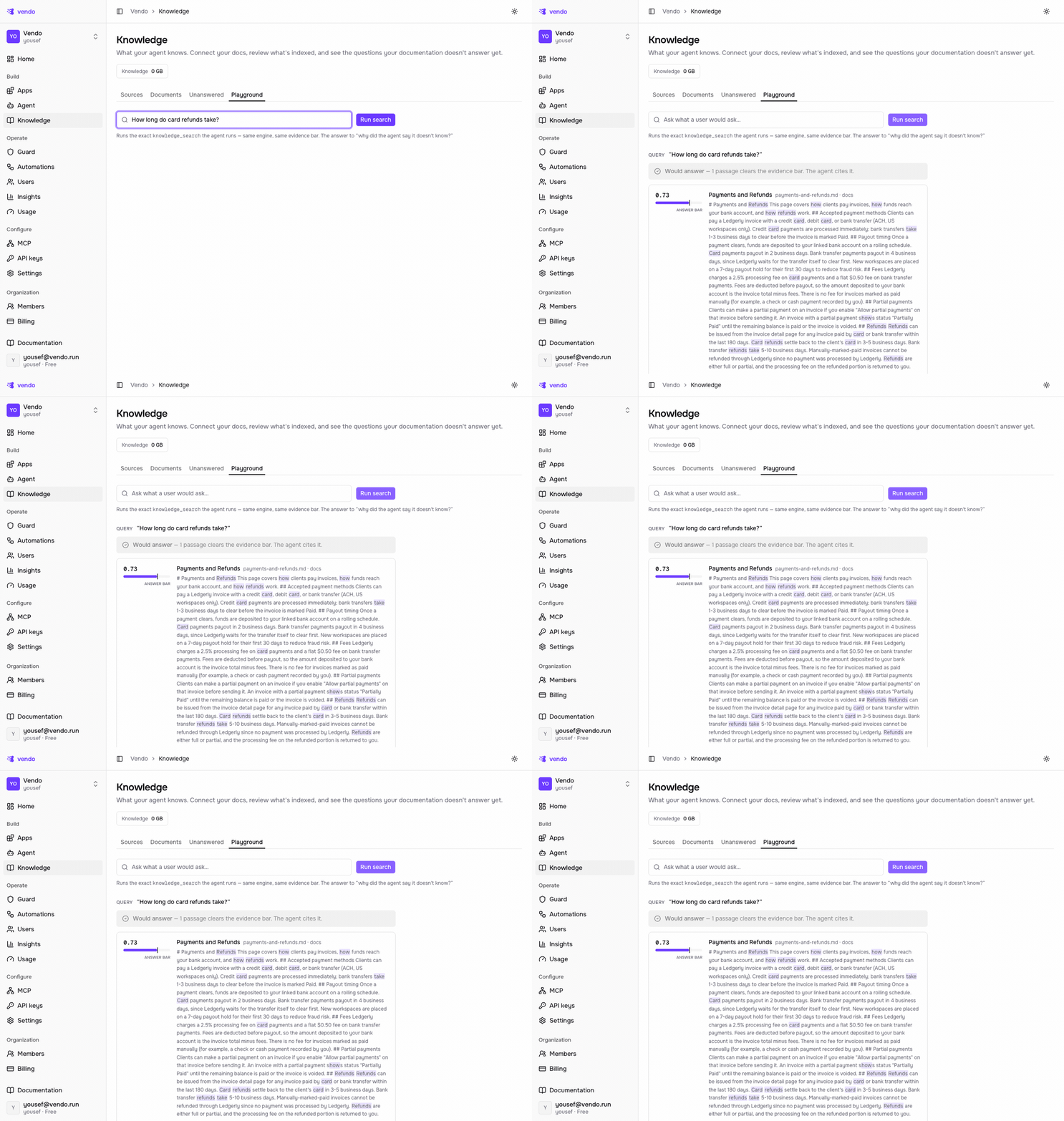
Running the question in the console Playground: one passage clears the evidence bar, and the agent cites it.
This is the console Playground, running the exact vendo_knowledge_search the
agent runs — same engine, same evidence bar. Ask a refund question — How long do card
refunds take? — and one passage clears the bar. The verdict reads Would
answer, and the passage sits right under it: the answer, scored, drawn from the
Payments and Refunds doc you uploaded. In your own app the user sees this as a
reply with a Sources row beneath it — one chip per document the agent read,
each opening to the snippet it used. The user can check the work without leaving
the thread. So can you, which is what matters when a screenshot lands in your
inbox.
When the docs don't cover the question, the thread says so — Searched the knowledge base — no matching documentation — and the agent tells the user it doesn't know rather than inventing a number. A blank is recoverable. A confident wrong answer about your refund window is not.
Start here
The tutorial has the parts this post skipped: the CLI door in full, document kinds and visibility tiers, what's worth indexing and what only adds noise. It's at docs.vendo.run/connect/knowledge.